
OKX Pay is a feature for sending and receiving digital assets on supported accounts. It requires an OKX account, identity verification (KYC), Pay activation, and passkey setup. Availability varies by region and account. The public materials reviewed do not establish whether Pay is available to residents of South Korea. Access to the app or an exchange account alone does not confirm eligibility to send or receive assets.
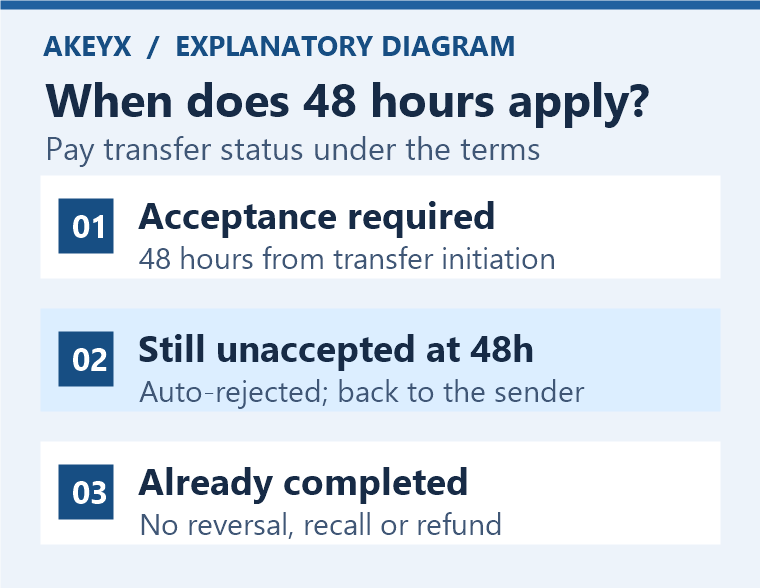
The return of unclaimed assets is also conditional. The Pay Wallet terms state that a transaction requiring the recipient's acceptance is automatically rejected if it is not accepted within 48 hours of initiation, and the assets are returned to the sender's Pay Wallet. Transactions requiring acceptance are considered complete upon acceptance; those not requiring acceptance are considered complete once all signatures are completed. Completed transactions cannot be canceled, recalled, or refunded. Not every mistaken transfer comes with a 48-hour opportunity to cancel. These distinctions are based on Section 2 of the official Pay Wallet terms (updated October 28, 2026).
Review date: November 5, 2026. This article provides information based on a comparison of official public documents; it is not an account of testing Pay activation, transfers, or returns using a real account. If the terms for a service differ from the account screen, first check the latest conditions applicable to your region.
How do Pay, exchange deposits and withdrawals, and cards differ?
This article covers contact-based sending and receiving with Pay and recipient status. The rules for on-chain exchange withdrawals or refunds for card merchant payments should not be applied directly to Pay's return of unclaimed assets.
| Channel | What to check |
|---|---|
| Pay transfers | Recipient identification details, Pay activation, whether acceptance is required, and transaction completion status |
| On-chain exchange deposits and withdrawals | Asset, network, address, Memo/Tag, transaction hash, and deposit confirmation requirements |
| OKX card payments | Card issuance eligibility, payment authorization, holds and settlement, merchant refunds, and card terms |
General deposits and withdrawals are covered separately in the deposit, withdrawal, and missing transaction troubleshooting guide, and card issuance and payment conditions in the guide to regional conditions for the OKX card. Being able to use Pay does not imply eligibility for card issuance or cashback.
Regional availability: Check the applicable terms before consulting a list of permitted countries
The official Pay FAQ states that eligibility varies by region and advises users to log in to check whether the features and rules apply to them. The following describes differences in the regional documents reviewed; it is not a list determining availability in every country. You should check not only your place of residence, but also the service provider entity through which you signed up and the supplemental terms that actually apply.
| Region or document | Differences identified and checks still needed |
|---|---|
| South Korea | The language on South Korea-related derivatives and P2P restrictions in the risk and compliance disclosure is not direct evidence of Pay eligibility. Whether Pay is offered to KYC-verified accounts held by South Korean residents, and whether sending or receiving is restricted, must be checked separately in the account screen and with official customer support. |
| European Economic Area (EEA) | The EEA supplemental terms separately specify the provider and responsibilities for card-linked services for OKX Europe Limited customers, among other matters. They should not be interpreted as establishing Pay, card, or rewards eligibility for all EEA residents. |
| Singapore | The Singapore supplemental terms take precedence if the applicable requirements are met, such as signing up through OKX SG. This document describes Pay Wallet as a custodial digital asset wallet. The separate eligibility conditions in the rewards section should not be read as general requirements for all Pay users. |
| Brazil | The supplemental terms for Brazilian customers distinguish the provider of Pay technology from the local entity's interface role and describe the technology as self-custodial. Do not combine this with Singapore's description of its custody model; check the document applicable to you. |
Sources: Risk and Compliance Disclosure, EEA Supplemental Terms, Singapore Supplemental Terms, and Brazil Supplemental Terms. The table does not replace a legal determination of where the service is available or whether it is lawful in South Korea.
For South Korea-related checks, also consult the guide to domestic use and regional conditions, but do not use a VPN, another country's information, or a different identity to circumvent restrictions. If your eligibility is unclear, it is safer to confirm it before depositing assets or making commitments that depend on receiving them.
Account, KYC, and passkey checks before activation
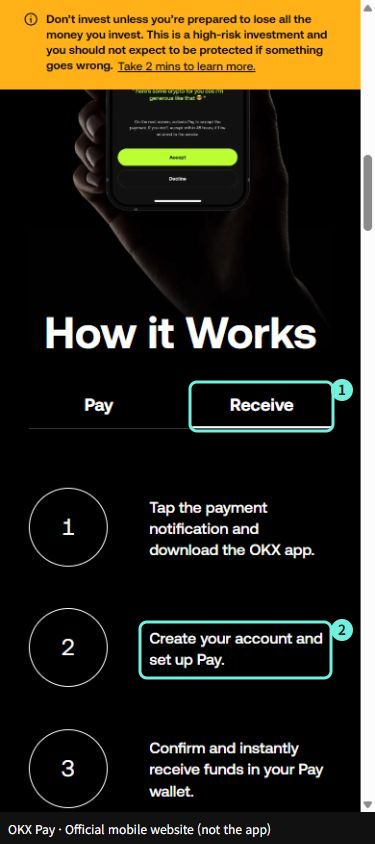
For eligible users, the official FAQ advises starting from Pay at the bottom of Simple mode in the OKX app, completing any required identity verification, and then setting up a passkey. These are app-based instructions, not a procedure for using Pay solely through a web browser. Menu names and availability may vary by app version and account.
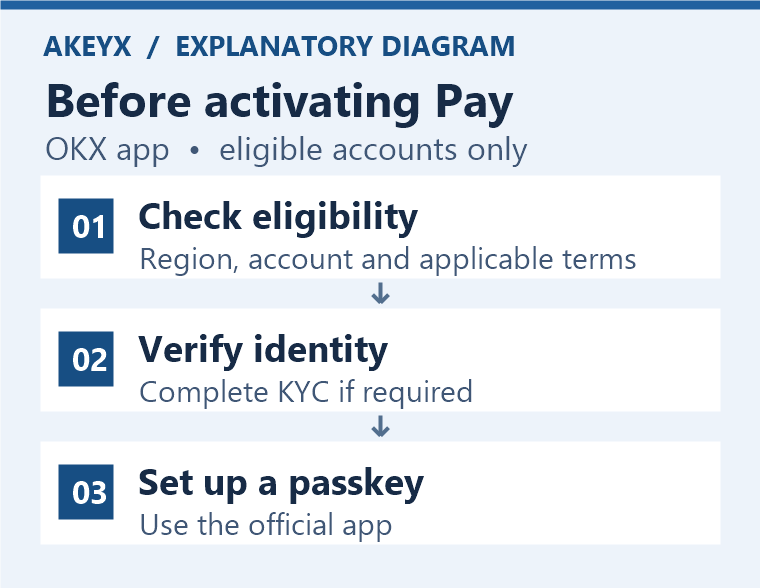
- Check the residence information, service provider entity, and applicable Pay terms for the account you are logged into. Do not install an unofficial app simply because the menu is unavailable.
- If Pay is available, complete the identity verification required for your account. Creating an account, completing KYC, and activating Pay are separate steps.
- Set up a passkey in the official app and check the devices and synchronization accounts you use, as well as your means of recovering access. Do not start by resetting your existing device or deleting your passkey.
- Check the supported assets and networks, available balance, and recipient details, then read the conditions on the final confirmation screen. Your total balance and the balance available for transfer may differ.
For identity verification preparation and reasons for rejection, see the KYC guide; for device replacement and authentication issues, see things to check before setting up or recovering a passkey. Do not confuse the official Pay Account FAQ's explanation of cloud passkey synchronization and recovery through customer support with the seed recovery process for a typical Web3 wallet.
What to check based on the recipient's status
Sending assets to a contact is not the same as the recipient actually receiving them. The official FAQ's explanations by registration status are summarized below, but whether assets can be returned depends not solely on whether the recipient has an account, but on whether the transaction requires acceptance and whether it is complete.
| Recipient status | Next steps and confirmation of completion |
|---|---|
| Pay activation completed | In the official app, check the sender, asset and amount, and confirm that the transaction is reflected in the Pay balance. Do not assume that a completed transaction automatically reflected in the balance has a 48-hour cancellation window. |
| Has an OKX account but not Pay | Eligibility must be verified and Pay must be activated. Do not consider the transaction complete merely because an instructional link was received; check the receipt and transaction status in the app. |
| No OKX account either | Eligibility verification, account creation, KYC and Pay activation are required. Do not send funds first on the assumption that the recipient can complete procedures that are unavailable in their region. |
| Pending acceptance or already completed | If acceptance is pending, check the start time and whether the transaction remains unaccepted. If it is already complete, the unreceived-funds return rule does not apply. Recovery cannot be guaranteed even if funds were sent by mistake. |
Sources: Pay FAQ sections 5–8 and 11 and Pay Wallet Terms section 2. The FAQ entry on transfers sent by mistake uses a recipient without an account as an example, while the entry on unreceived funds describes cases where the recipient has no Pay account. Rather than simplifying this to “a refund is guaranteed if there is no account,” we read it alongside the definitions of acceptance and completion in the more recent terms.
Return after 48 hours without receipt: Distinguishing the start time, conditions and actual return
The reference time is the transaction start time specified in the terms. The rule does not start a new 48-hour period from when the SMS was read, the app was installed or the recipient signed up. First, check whether the transaction requires acceptance and whether it remains unaccepted.
Calculating the deadline: Assumption, formula and result
- Assumption: A transaction requiring acceptance started at 9:00 a.m. (KST, UTC+9) on November 5, 2026 and remained unaccepted afterward. This is an illustrative example, not an actual transaction record.
- Formula: Start time + 48 hours = start time + 2 days.
- Result: The automatic rejection threshold under the terms is 9:00 a.m. (KST) on November 7, 2026. If the recipient accepts the transaction and it is completed in the meantime, this unreceived-funds condition does not apply.
- Limitation: The automatic rejection threshold and the moment the return appears in the app balance are not guaranteed to coincide. System availability and transaction processing status must be checked, and this example does not calculate a bank or card refund deadline.
This calculation helps determine when to check a transaction pending acceptance. It cannot be applied as-is to transactions that require no acceptance and have all signatures completed, transactions completed after acceptance, or ordinary on-chain withdrawals. If a different time zone is displayed, align it with the time zone in the transaction record before comparing.
If the deadline has passed and the return is not visible, compare the sender's Pay transaction history, current status and available balance. Gather the transaction reference number, start time and time zone, asset, amount and any error message, then contact customer support through the official app. Do not repeatedly send the same amount before checking. Do not send passwords, verification codes, passkey access information or recovery phrases in a support request.
What has been confirmed about fees, supported assets and security risks?
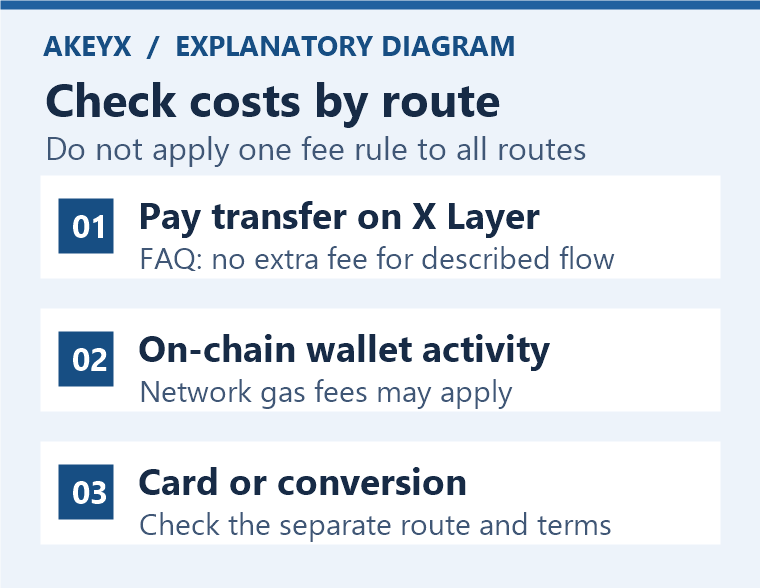
The official FAQ says there are no additional fees for the X Layer Pay transfers described, but the underlying terms state that on-chain activities such as wallet deposits, withdrawals and smart contracts may incur gas fees and that fees may also apply to specific features. Therefore, do not extend this to mean that “all Pay-related transfers and conversions are free.” The cost of buying assets, the routes for moving them into or out of Pay, and card payment costs must each be checked.
The code and sign-up link on this page provide information about exchange registration and rebate terms. Do not read them as a promise of discounts on Pay transfers, gas fees or card payments. Regardless of whether you sign up, you must check Pay eligibility, costs and return conditions.
The wording on supported assets also differs between documents. The separate Pay FAQ reviewed this time lists USDG and USDC, while the FAQ cited earlier also lists USDT. Both documents note that they may not apply to all customers, so we cannot conclude that all accounts, including those in Korea, can use the same assets. Check the assets, networks and final fees displayed on the Pay screen for your own account.
- Balance: The total balance and available balance may differ if there are card-linked reservations, authorization holds or similar restrictions. Do not assume that the entire displayed total can be sent.
- Assets and technology: Stablecoins are not the same as cash deposits and carry risks involving depegging, issuers, networks and smart contracts. The 48-hour rule is not a guarantee of asset value or principal.
- Recipient: Check for people with the same name and incorrect contact details. Cancellation of a completed transfer sent by mistake cannot be guaranteed. Be wary of requests to send money first to release a deposit or return.
- Authentication and recovery: Do not rely solely on text or email notifications; verify the amount and counterparty details in the official app. Use the official recovery process for passkey or cloud account access issues, and do not disclose security information to third parties.
Frequently asked questions
Can I use OKX Pay in Korea?
The publicly available official materials reviewed do not establish whether Korean residents are eligible to send or receive funds through Pay. Check Pay availability for a Korea KYC account, the applicable terms and usage restrictions in the official app and with customer support. Do not infer Pay eligibility from an exchange account or card-related information alone.
When will the funds return if the recipient does not receive them?
The Pay Wallet terms state that a transaction requiring recipient acceptance is automatically rejected if it is not accepted within 48 hours of initiation, and the assets return to the sender's Pay Wallet. Check whether acceptance is required, the start time and the actual transaction status; this rule does not apply to completed transactions.
Can I cancel a transaction sent by mistake within 48 hours?
No. A transaction requiring acceptance is considered complete once accepted; one that does not require acceptance is complete once all signatures are completed. Under the terms, completed transactions cannot be canceled, recovered or refunded. Automatic return of unreceived funds is not a general cancellation grace period.
Does the recipient also need to complete KYC and activate Pay?
The official FAQ explains that identity verification must be completed to receive or manage assets, and that existing OKX users without Pay and new users need to activate Pay. Receiving a notification or link alone does not complete eligibility verification or actual receipt.
Are all costs associated with OKX Pay free?
No. Distinguish the FAQ's description of Pay transfers without additional fees from gas fees for wallet deposits, withdrawals or smart contracts, and costs for other features. Check the final confirmation screen and terms for the applicable region, asset and route.
Official sources and scope of review
The key definitions of return and completion are based on the Pay Wallet Terms and Conditions, updated October 28, 2026. Account and receipt procedures are based on the Pay FAQ, updated September 11, 2026, and the Pay Account FAQ, updated August 13, 2026. We also compared regional supplemental terms, risk disclosures and an FAQ with a different asset list.
AKEYX added the differences between documents applicable in each region, a comparison of completion evidence and next steps by recipient status, and a 48-hour calculation using an assumed start time. The official documents were reviewed on November 5, 2026, and the actual eligibility, restrictions, fees and return processing outcome for your account have not been verified. If the terms, supported regions, assets or return rules change, the table and example must also be checked again.